Read
Check product names and quantities. Press R to cycle active orders.
Turn a customer ticket into carrying trips, crew roles, and a practical upgrade focus—without made-up costs or mystery stats.
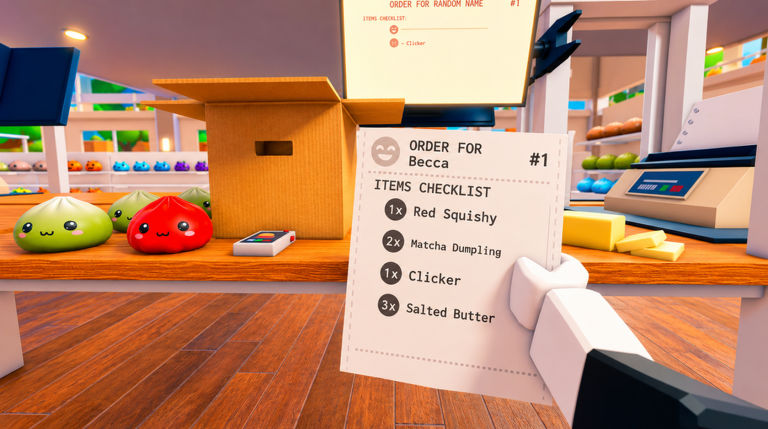
Use the sample ticket seen in official artwork, or replace it with your own order. The result updates instantly.
1 picker · 1 packer/loader. Swap only when one station becomes idle.
Test Carry Capacity when a ticket takes repeated shelf runs.
Planning estimate only. Shelf distance, item placement, animations, and undocumented upgrade values are not included.
These stages come from the official game description, control list, and game artwork. Strategy notes remain clearly separate.
Check product names and quantities. Press R to cycle active orders.
Group your collection run by aisle or nearby shelf area.
Use Right Click or Y when two products look too similar.
Cycle carried items and place each match into the correct box.
Move the finished carton to the delivery truck to finish the loop.
Learn the verified ticket-to-truck loop and avoid the first mistakes that waste a run.
Use the developer-listed PC controls to switch orders, inspect products, and manage carried items.
Match Speed, Reach, or Carry Capacity to the part of your warehouse route that slows you down.
Build a simple picker, packer, and loader workflow without treating editorial roles as official classes.
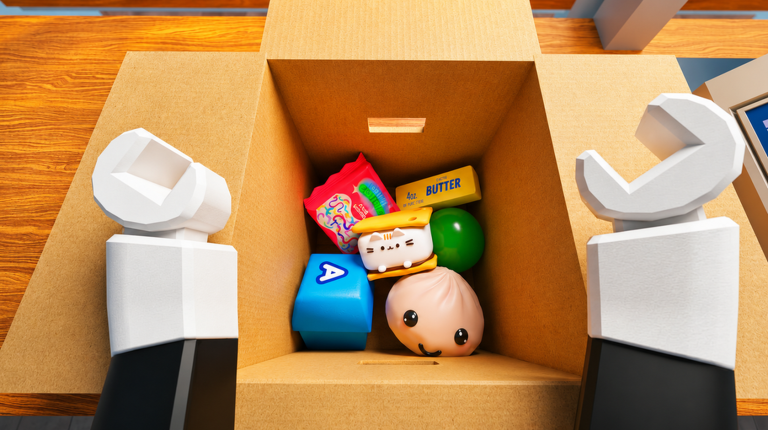 OFFICIAL ROBLOX GALLERY · JUL 19 SNAPSHOT
Speed, Reach, Carry Capacity, abilities, coins, 12-player servers, and the listed PC controls.
Named multi-quantity ticket items and a separate taping/packing step shown in official artwork.
Planner trips and crew roles. Helpful for preparation, but not an in-game performance guarantee.
Upgrade costs, exact stat gains, ability details, shelf coordinates, and code redemption.
Pack an Order is a Roblox warehouse simulation where players find requested items, pack the matching boxes, and load delivery trucks against the clock.
As of July 19, 2026, no active code and no in-game redemption interface are verified in the official description.
It calculates total ticket units and the minimum number of carrying trips based on the capacity you enter. It is a planning estimate, not an in-game timer.
The official description names Speed, Reach, and Carry Capacity. Exact costs, levels, and stat gains are not currently documented there.